You know the drill. You’re texting back and forth about Saturday night. Someone drops a restaurant link. Then a parking address. Then “Wait, what time does that place close?”
Thirty messages later, you’ve got a digital scavenger hunt across three apps, and you’re already tired before the date even starts.
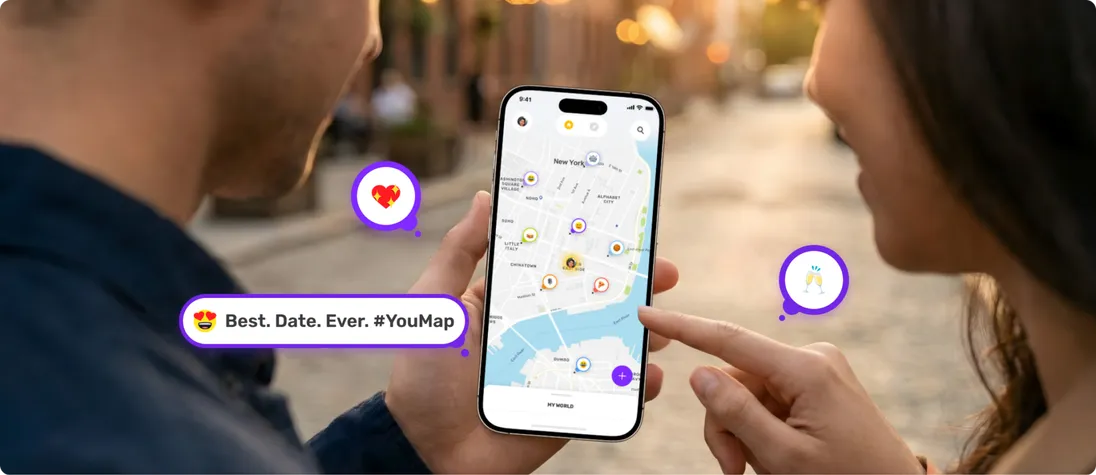
Here’s the thing: the best tool for couples isn’t another quiz app or shared calendar. It’s a collaborative map like YouMap.
When you can see your date night laid out visually, logistics stop feeling like work. They start feeling like anticipation. Like the date already started.
Why “Map Planning” is the New Love Language
Most couple apps focus on relationship maintenance. Quizzes. To-do lists. Calendar syncing. But none of them are about experiences. None of them say “I thought about where we’d watch the sunset and which taco spot we’d hit after.”
A shared map on YouMap does.
When you build one for date night, you’re designing a journey. A map proves you thought about the experience, not just the reservation.
How to Create a Collaborative Map (The Easy Way)
Step 1: Create the Map
On YouMap, give your map a vibe with a title, emojis, and image headers. This isn’t just “Saturday Night.” It’s “Neon Lights & Late Night Bites” 🌮 or “Coastal Drive + Fish Tacos” 🌊.
These details make it feel curated instead of generic.
Step 2: Add Your Places
Search for locations and pin them to your map. Here’s your formula:
- The Activity: Something visual or experiential. A sunset lookout. A bookstore. A mural wall.
- The Main Event: Dinner. Drinks. The concert.
- The “Just in Case”: The pro move. A backup dessert spot. A cozy bar if the main place is packed.
You’re building a safety net that looks like spontaneity.
Step 3: Add Posts with the Details
For each place, create a post with context. Add photos that capture the vibe. Include practical details like closing hours.
Here’s the romantic part: add why you chose it. “This is where we can watch the city light up” or “They have that wine you loved.”
Your partner can comment and react on each post. Heart the taco spot. Ask “Do we need a reservation?” Add notes like “We should get there early for parking.”
Planning becomes a conversation.
Step 4: Invite Your Partner to Collaborate
Share your YouMap and invite your partner to manage it with you. Now they can add their own places. Drop pins for spots they’ve been wanting to try. Create posts with their own photos and notes.
Maybe you planned the sunset lookout, but they add that ice cream shop they saw on Instagram. Suddenly you’re building the date together.
That’s when planning stops being a chore and starts being part of the date itself.
3 “Map Date” Ideas You Can Create
1. The “Mini Road Trip”
Add three places you want to stop at along a scenic drive. Hit the road by 4pm to catch sunset at stop two. Best part, after the drive, you can add posts and details of the roadtrip.
2. The “Memory Lane” Map
Add places and posts of where you first met. Your first kiss. The pizza place from your third date. Then retrace the route together.
3. The “Crawl”
Pick a category (coffee, tacos, vintage shops). Add four places within walking distance. Hit them all in one afternoon. Add posts as proof and reviews of each spot. Declare a winner of the best spot for you and your partner.

Why YouMap Works Better Than Google Maps
You probably Googled “how to make a collaborative google map” before landing here. Google Maps is incredible for navigation and finding the fastest route.
But the Google Maps collaborative map experience? First, you find “My Maps,” buried in a menu. Then you’re on desktop because mobile is clunky. You’re dragging pins onto what looks like a spreadsheet. It feels functional. Like filing taxes.
Here’s where YouMap is different:
- It’s Social: YouMap is built for the social side of maps. Chat directly on posts.
- It’s Visual: Add cover photos that capture the vibe. Your map has a feed, like a mini Instagram story for your date night.
Google Maps gets you there. YouMap maps your experiences and stories the way you want them to be mapped.
Don’t Just Go to Dinner. Go on a Journey.
The magic isn’t in the destination. It’s in the design.
When you take ten minutes to build a shared map on YouMap, you turn an ordinary Saturday into something memorable. You stop defaulting to “the usual spot” and start creating experiences worth talking about.
Ready to build your first map? Download YouMap and plan something for this weekend.
Need inspiration? Check out and follow the Romantic Getaways Map on YouMap for ideas on dreamy date spots and weekend escapes.
Your partner’s going to open it and smile. That’s the whole point.